ENGINEERING NOTES
Why we built Glim: fewer apps just to read your files
How Glim combines Rust, GPUI and macOS native readers in one workspace, with basic editing and explicit format limits.
An agent finishes a task and leaves a Markdown report, a JSON response, a CSV export and a few screenshots. Reading the result means opening a browser preview, a text editor, a spreadsheet app and an image viewer. The work is in one folder; the tools for checking it are scattered across the desktop.
That is the problem we started Glim to solve. We want one Mac app for opening those files and looking at what is actually inside. A rendered document when that helps, the original source when you need it, and basic text editing for small corrections.
AI-generated output is one reason this problem has become more noticeable. The files do not have to come from an agent, though. A project folder, a downloaded dataset or a collection of reference documents presents the same everyday friction.
A shared workspace, different readers
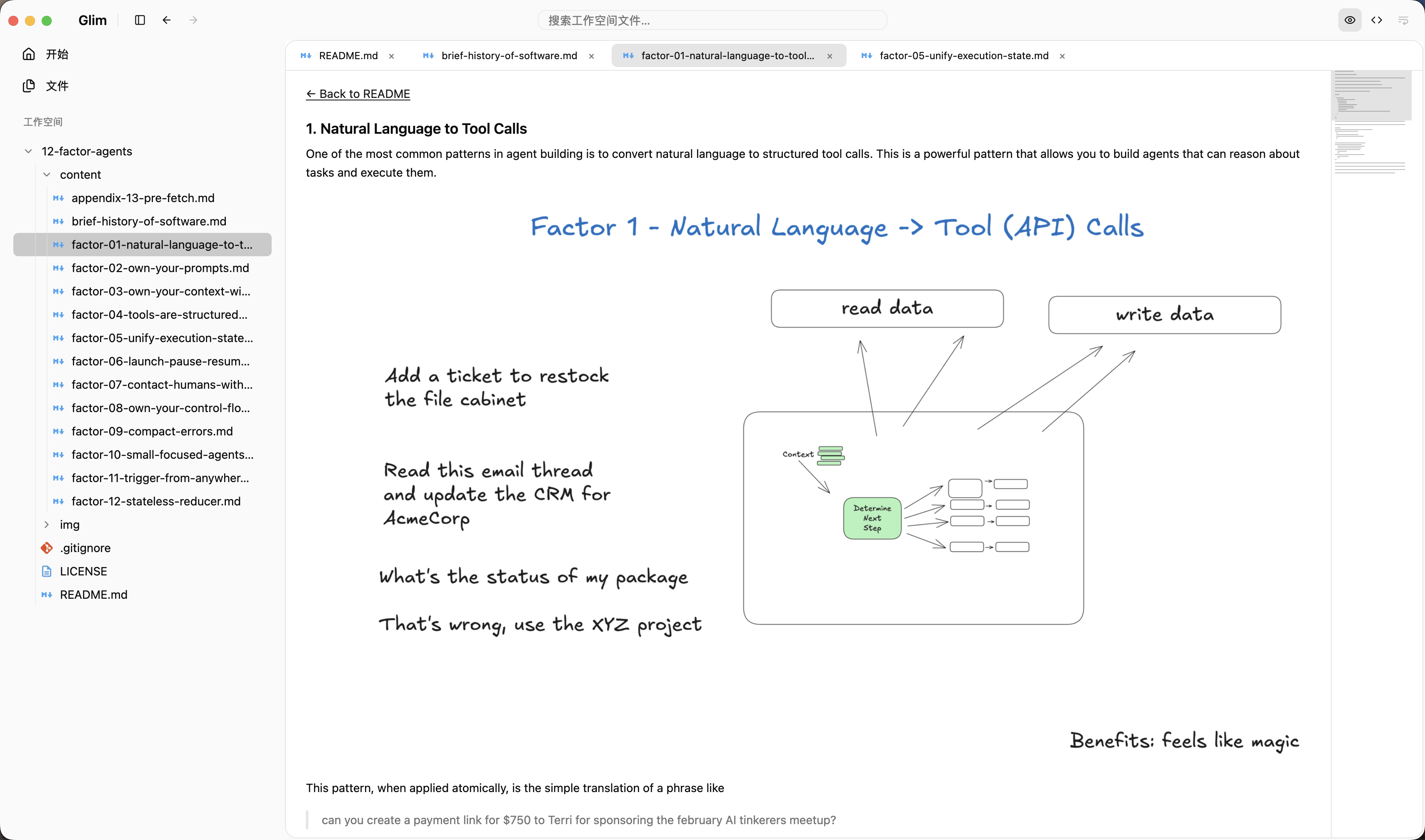
A PDF and a JSON file do not need the same interface. The useful common ground is the workspace: open files, tabs, navigation, search and a consistent place for reader actions. Inside that frame, each format can use the view that fits it.
- Markdown gets rendered text, diagrams, formulas and a source view.
- JSON gets an expandable tree; CSV and TSV get a table projection with access to the original source.
- PDFs, images and supported Office documents get format-specific previews.
- SQLite gets a read-only snapshot for browsing local tables, rather than a database administration console.
“Supports a format” needs qualification. A CSV table is not a spreadsheet calculation engine. An Office preview does not offer the editing or layout fidelity of its original application. An EPUB reader does not necessarily preserve publisher CSS or fixed layout. We keep a format guide so those differences can be checked before downloading.
Why Rust and GPUI
We chose Rust because ownership, explicit data structures and compiler checks give us useful tools for managing file buffers, background work and the lifetime of reader state. When coding with an agent, compiler errors also give the iteration a concrete set of constraints. Passing the compiler still does not prove that a parser is correct, a save is safe or a UI interaction works.
GPUI and GPUI Kit provide the application shell: the workspace, tabs, file navigation and shared controls. Reader entities stay alive across renders instead of rebuilding their state whenever the UI redraws.
The dependency direction is deliberately small:
glim-app → glim-services → glim-core
     └──────────────────→ glim-core
The core owns values and parsing logic without GPUI or I/O. Services handle work such as filesystem access, file watchers and format processing without importing the UI. The app presents the results and coordinates interaction. Blocking file work runs on the background executor; render methods compose cached state rather than scanning folders or running commands.
Use macOS where it already has a reader
Glim combines its Rust/GPUI workspace with Swift/AppKit readers. PDFKit handles PDF presentation, ImageIO helps with image preparation, and WebKit is used for selected document rendering. These views live inside the same workspace rather than requiring a separate app window for each format.
This saves us from treating every file type as a new rendering engine to implement. It also brings constraints: Office layout and media codec support depend on macOS, and embedded native views need their lifetimes, focus and actions coordinated with the GPUI shell.
Reader controls are defined as shared actions and presented in the toolbar and content menus. A format can supply its own ordered controls without inventing a separate menu policy for every view. The architecture notes describe those boundaries in more detail.
Large files need a different reading strategy
Loading an entire file and then deciding how to display it is a poor default for a viewer. Glim uses streaming, paging, bounded projections and on-demand decoding in its non-Git readers. Very large text can be read in pages; an image preview can prepare a thumbnail without decoding the full image into a Rust buffer.
The distinction is between the size of the file and the amount of work active at once. A reader may limit a rendered projection or a decoding buffer while retaining access to the source through a fallback view. This does not mean every format has unlimited rendering fidelity, or that every path has the same strategy; Git/diff processing still has separate constraints.
Application reader budgets live in one shared policy file, with generated values used by Rust, Swift and diagram rendering. The reader policy documentation explains what each budget changes.
Small edits, clear boundaries
Sometimes checking an output means fixing a typo or changing a value. Ordinary UTF-8 files support basic editing, undo/redo, autosave and explicit save. Large paged text, images, diffs and document previews remain read-only. Glim is not intended to grow an LSP, extension marketplace or a full IDE workflow.
The source also contains Git workspace functionality, but the Git navigation entry is hidden in the version this article describes. We are not presenting it as the main download-and-try experience.
Try it on a folder you already have
Open a small project folder with a README, some data and a PDF or image. See whether having those readers in one place reduces the switching you normally do. If a format is missing or renders incorrectly, an example that can be shared publicly is more useful to us than a request to “support everything.”
Glim is free, MIT-licensed and maintained for macOS on Apple Silicon and Intel. Current DMGs are ad-hoc signed and are not Apple-notarized. Follow the release installation instructions if macOS blocks the first launch. Native previews have format-specific limitations; Glim is not an Office editor or a complete replacement for specialist tools.
Technical references: architecture, format support and reader policy. These links are pinned to v0.2.7, the version used for this article.