CSV on Mac
A CSV export often belongs beside a report, a configuration or a script. Glim lets you read the rows without leaving that folder workspace.
Free and open source · Apple Silicon & Intel · macOS 11 or later. Not yet Apple-notarized.
Open the export
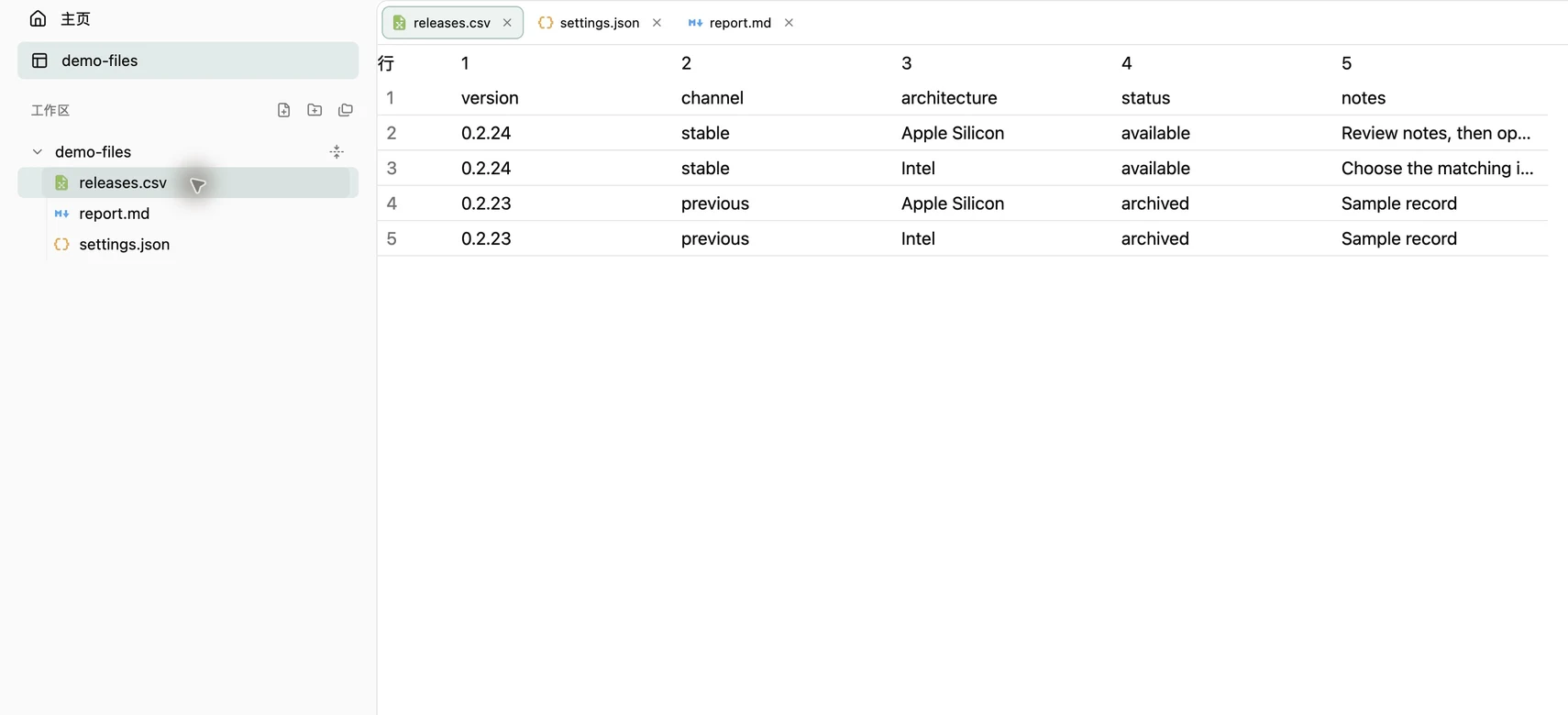
Press ⌘O and choose a .csv or .tsv file. Choose CSV Table in the toolbar to read the grid. A virtualized table keeps the visible rows in the reading area; the source remains available in the adjacent view.
For a folder of related exports and reports, use ⌘⇧O and open the files from the sidebar. Each file stays in its own tab.
Try a quoted field
Download releases.csv below. The first record has a note containing a comma inside quotes: "Review notes, then open the DMG". It belongs in one field. Compare Table and Source to see how the text file represents the rows. Inspect the complete cell value when the table shortens its display.
The first line in this example contains column names. A CSV is still a text file: do not assume every export has the same header or column layout.
version,channel,architecture,status,notes
0.2.24,stable,Apple Silicon,available,"Review notes, then open the DMG"Edit the source carefully
The table is read-only. Choose Source for a small text correction in a supported UTF-8 file. Preserve delimiters, quotes and line breaks. Existing files save automatically to the original after a typing pause, and ⌘S also saves. Use a copy when checking an unfamiliar export.
Glim is not a spreadsheet calculation environment. For formulas, pivot tables or bulk transformations, use a spreadsheet, database or data-processing tool.
Format and privacy limits
The CSV/TSV reader supports quoted and multiline fields, a byte-order mark and uneven rows. Check the format reference for current support. Saving a file with a different extension does not convert it to an Excel workbook or another binary format.
Files open locally; updates and enabled usage statistics can use the network. Loading a Markdown or HTML file in another tab may also request remote resources. The privacy reference explains these paths and the usage-statistics setting.
Try your own files
Choose the DMG for your Mac architecture and drag Glim into Applications. If first launch is blocked, confirm the source and follow the installation guide for system approval.