Markdown on Mac
A README can contain the explanation, the diagram and links to the files behind it. Glim keeps those files in one workspace.
Free and open source · Apple Silicon & Intel · macOS 11 or later. Not yet Apple-notarized.
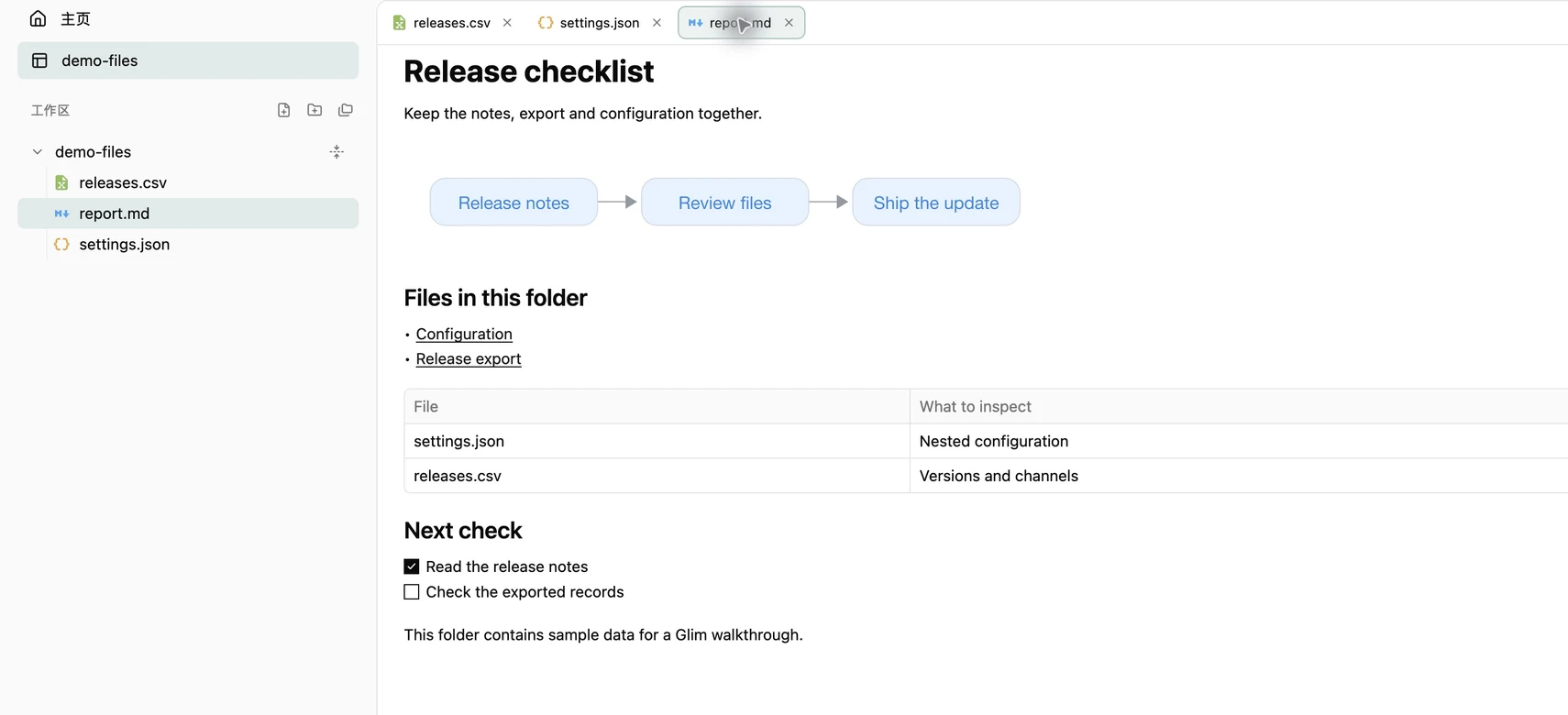
Open a local README
Install Glim, then press ⌘O and choose a .md file. For a README with nearby images or data, use ⌘⇧O to open its folder and select the file in the sidebar. Choose Preview in the toolbar to read the rendered document.
Local links open related files. Keep the README, a JSON configuration and a CSV export in adjacent tabs instead of switching applications for each file.
Try a Mermaid diagram
Download the sample below, along with its JSON and CSV files, and keep all three in the same folder. Open report.md in Glim. Its Mermaid flowchart renders in Preview; the Configuration and Release export links open the adjacent files.
```mermaid
flowchart LR
  Notes[Release notes] --> Review[Review files]
  Review --> Ship[Ship the update]
```Make a text correction
Choose Source to inspect a fenced block or fix a typo. Existing UTF-8 files save automatically to the original after a typing pause; ⌘S also saves. Duplicate a file first when you want to experiment without changing the original. Tables, diagram images and document previews are not visual editors.
Rendering and network limits
Glim supports Markdown tables, task lists, footnotes, formulas and several diagram engines. Mermaid engines are bundled and render diagrams as static images through macOS WebKit. Failed blocks show an error and their source. Do not assume every extension used by a website or editor will render identically.
Local document reading and bundled diagram rendering do not require uploading the document. Remote Markdown images can make network requests; update checks and enabled usage statistics can also use the network. See the format and privacy references for the exact boundaries.
Try your own files
Choose the DMG for your Mac architecture and drag Glim into Applications. If first launch is blocked, confirm the source and follow the installation guide for system approval.