JSON on Mac
An exported response or configuration is easier to inspect when objects and arrays have a visible hierarchy. Open it beside the document that explains it.
Free and open source · Apple Silicon & Intel · macOS 11 or later. Not yet Apple-notarized.
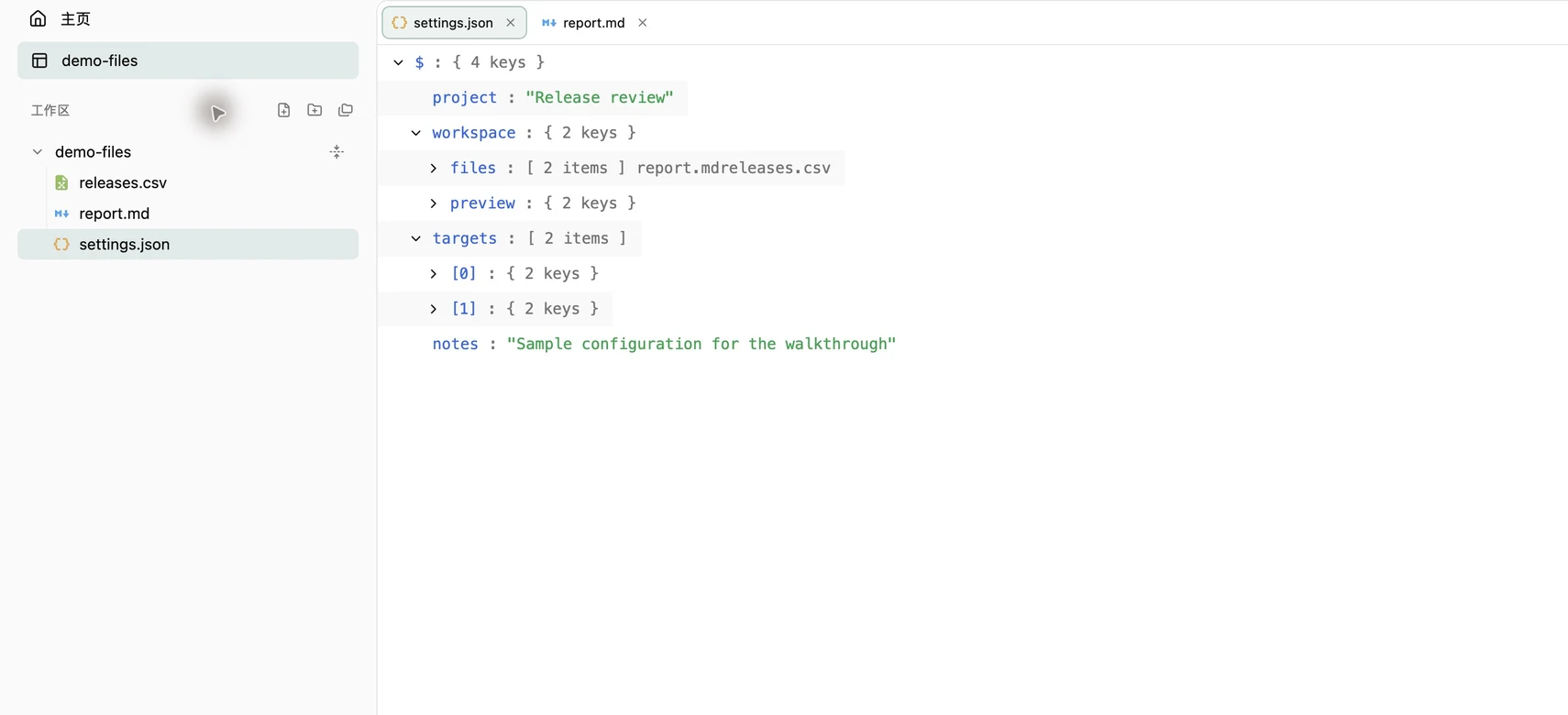
Open the tree
Press ⌘O to open a JSON file, or ⌘⇧O for the folder containing it. Choose JSON Tree in the toolbar. Expand an object to reveal its keys and an array to inspect its items; collapse branches you are not reading.
The tree is read-only and loads branches on demand. Opening a nested configuration for inspection does not require pasting it into a web service.
Inspect the sample
Download settings.json below. Expand workspace to find the file list and preview settings, then expand targets to see the two Mac architectures. These are sample configuration values, not measurements or a live service response.
{
  "workspace": {
    "files": ["report.md", "releases.csv"],
    "preview": {"markdown": true, "diagrams": "Mermaid"}
  }
}Check the original text
Choose Source when whitespace, a comment or an exact value matters. Ordinary UTF-8 source supports basic editing, undo and redo, automatic saving and ⌘S. Automatic saving writes the original file; work on a copy when experimenting. The tree itself does not edit the JSON.
Keep an explanation in Markdown or the CSV export beside it in the same workspace. Title-bar search finds files by name or path; it is not a query language for JSON records.
JSON-family boundaries
The supported family includes JSON, JSONC, JSON5, NDJSON/JSONL, GeoJSON and notebook structures. JSONC accepts comments and trailing commas; newline-delimited JSON is projected as an array of line records. GeoJSON inspection does not display a map, and notebooks are not executed.
Use a schema validator, query tool or programming environment when you need those capabilities. Glim focuses on reading the local structure and source. Files open locally, but updates, enabled usage statistics and network resources in other readers can connect to the internet.
Try your own files
Choose the DMG for your Mac architecture and drag Glim into Applications. If first launch is blocked, confirm the source and follow the installation guide for system approval.